
What Is Keyboard Express? A Powerful Productivity Booster for Windows
Keyboard Express is a lightweight yet powerful utility designed to help Windows users automate repetitive keyboard tasks. Since its debut in 2003, this free software has earned a loyal following, with over 6,400 downloads and steady interest from users in the Czech Republic, Chile, and the United Kingdom. Despite being last updated in 2007, Keyboard Express remains a viable option for those seeking a no-frills macro tool that runs efficiently on older systems.
The software allows you to assign custom macros to individual keys or key combinations, turning your keyboard into a personalized automation hub. Whether you're typing out email signatures, inserting code snippets, launching frequently used applications, or executing simple scripts, Keyboard Express streamlines your workflow with minimal setup. One of its standout features is its low system footprint—requiring less disk space than most tools in the software utilities category.
This makes it ideal for users running older hardware or systems with limited resources. The software supports Windows 95 and all subsequent versions, making it compatible with a wide range of legacy systems. While the interface is simple and functional, it lacks modern design elements, which may deter some users.
However, its core functionality remains solid. With a clean, straightforward setup process and no complex configuration, Keyboard Express is perfect for beginners and power users alike. The trial version offers full access to all features, so you can test its capabilities before deciding to use it long-term.
For those looking for a reliable, secure, and free keyboard automation tool, Keyboard Express delivers on its promise of simplicity and performance.
Key Features of Keyboard Express – Automate Your Workflow Effortlessly
Keyboard Express is packed with practical features that make it a go-to choice for keyboard automation enthusiasts. One of the most valuable features is the ability to assign custom macros to any key on your keyboard. This means you can turn a single key press into a complex sequence—such as typing out a full email signature, launching a program, or even running a batch script.
For professionals who type repetitive content—like customer service reps, developers, or writers—this feature drastically reduces manual input and minimizes errors. The software supports multiple macro types, including text insertion, program launching, and keystroke simulation, giving users full control over how their keyboard behaves. Another standout feature is its compatibility with older Windows systems, including Windows 95, 98, ME, NT, 2000, XP, and Vista.
This makes it an excellent choice for users who still rely on legacy systems or need a lightweight alternative to modern automation tools. Keyboard Express also offers a simple yet effective configuration interface. You can assign macros by simply selecting a key, entering your desired action, and saving the setting.
There’s no need for scripting knowledge or advanced technical skills. The tool also includes a built-in macro editor, allowing you to fine-tune your sequences with precision. For added convenience, you can organize macros into groups, making it easy to manage complex setups.
While the software lacks cloud sync or cross-device support, it compensates with speed and reliability. It runs in the background with minimal impact on system performance, ensuring your computer stays responsive. The fact that it’s free and secure—without ads or bundled software—adds to its appeal.
Whether you're a student, office worker, or IT professional, Keyboard Express provides a straightforward way to boost efficiency without breaking the bank.
- Assign custom macros to any keyboard key or key combination
- Insert predefined text, such as email signatures or code snippets
- Launch programs or open files with a single keystroke
- Execute batch scripts and commands automatically
- Supports Windows 95 and later versions, including XP and Vista
- Lightweight with minimal system resource usage
- Simple, intuitive interface with no learning curve
- Free to download and use with no hidden costs
How to Install and Use Keyboard Express on Your Windows PC
Getting started with Keyboard Express is a breeze, even for users with minimal technical experience. First, visit a trusted software download site and search for “Keyboard Express.” Download the installer file, which is typically a small executable (under 1 MB), ensuring fast downloads even on slow connections. Once the file is downloaded, double-click it to begin installation.
The setup wizard is straightforward: follow the on-screen prompts, accept the license agreement, and choose your installation directory. The software installs quickly and doesn’t require a restart. After installation, launch Keyboard Express from the Start menu or desktop shortcut.
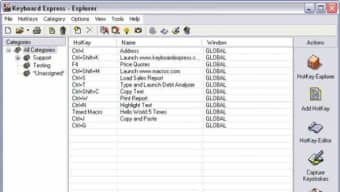
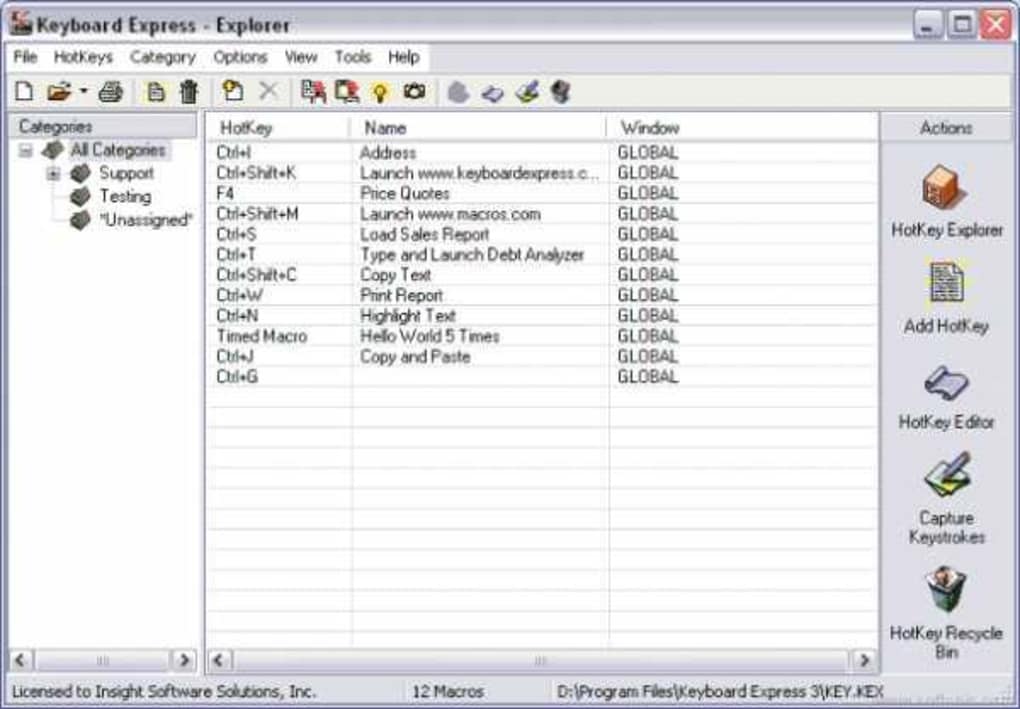
The main interface is clean and minimal, with a list of keys and their assigned macros. To create a new macro, click the “Add” button and select the key you want to customize. You’ll then be prompted to choose the macro type—text, program launch, or script execution.
For text macros, simply type or paste the content you want to insert (e.g., “Best regards, John Doe”). For program launch macros, browse and select the application or file you want to open. For script macros, enter the command or path to the batch file.
Once configured, the macro activates immediately. You can test it by pressing the assigned key. Keyboard Express also allows you to disable or reassign macros at any time.
To manage your macros, use the built-in editor to view, edit, or delete entries. The tool runs in the background and starts automatically with Windows, ensuring your shortcuts are always ready. For advanced users, the software supports saving and loading macro profiles, allowing you to switch between different setups.
While the software hasn’t been updated since 2007, it remains stable and functional on modern Windows systems through compatibility mode. If you encounter any issues, ensure you’re running it as an administrator and check the system’s compatibility settings. Overall, Keyboard Express offers a frictionless experience from download to daily use.
Pros and Cons of Keyboard Express – Is It Right for You?
Pros
- Free to download and use with no limitations
- Extremely lightweight and fast, ideal for older systems
- Simple, intuitive interface suitable for beginners
- Supports multiple macro types: text, program launch, scripts
- Runs in the background with minimal system impact
- Compatible with Windows 95 and later versions
- No ads, no bundled software, and secure download
Cons
- Last updated in 2007—no recent improvements or modern features
- Lacks support for newer operating systems like Windows 11
- No cloud sync or cross-device compatibility
- Interface is outdated and lacks modern design
- No mobile or Mac support—Windows-only
- Limited customization options compared to newer tools
Frequently Asked Questions (FAQ)
Is Keyboard Express free to download and use?
Yes, Keyboard Express is completely free to download and use. There are no trial limitations, paid upgrades, or hidden fees. You can access all features without any cost.
Can I use Keyboard Express on Windows 11?
While Keyboard Express was last updated in 2007, it may still work on Windows 11 through compatibility mode. However, Microsoft does not officially support it on newer systems, so results may vary. We recommend testing it in a safe environment first.
Does Keyboard Express support Mac or Android devices?
No, Keyboard Express is Windows-only and does not support Mac, iOS, or Android devices. It is designed exclusively for Windows operating systems from Windows 95 onward.
Can I assign macros to function keys and special keys?
Yes, Keyboard Express allows you to assign macros to any key, including function keys (F1-F12), arrow keys, and special keys like Ctrl, Alt, and Shift. You can even create combinations like Ctrl+Shift+T.
Is Keyboard Express secure to download?
Yes, when downloaded from reputable software repositories, Keyboard Express is secure. It does not contain malware, ads, or bundled software. Always download from trusted sources to ensure safety.
Final Verdict: A Nostalgic but Functional Tool for Productivity
Despite its age, Keyboard Express remains a surprisingly useful tool for users who need a simple, reliable way to automate keyboard tasks. Its lightweight design, free access, and compatibility with older Windows systems make it a solid choice for those working with legacy hardware or seeking a no-nonsense automation solution. While it lacks modern features like cloud sync, mobile support, and advanced scripting, its core functionality is still effective.
If you're a power user who values efficiency and doesn't need flashy design or frequent updates, Keyboard Express is worth trying. For beginners or professionals on a budget, it offers a secure, straightforward way to boost productivity. Download it today and experience the convenience of keyboard macros—no strings attached.
Ready to simplify your workflow? Download Keyboard Express now and start automating your daily tasks with just one keystroke.







